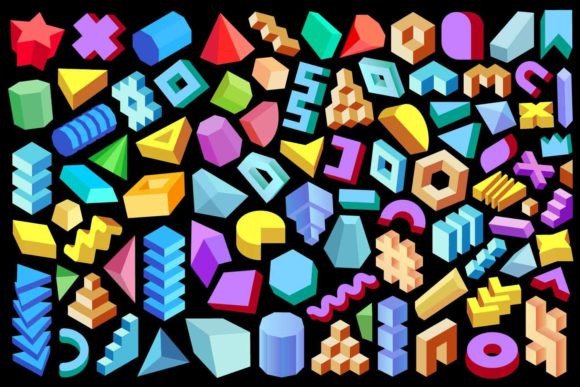
3D Design Elements: Enhancing Creativity and Precision in Modern Design
3D Design Elements have become an essential component in the world of graphic design, architecture, product development, and digital art. These elements refer to three-dimensional shapes, forms, and figures that can be manipulated to create depth, realism, and visual interest in a wide range of creative projects. Whether you're designing for print, web, or interactive media, incorporating 3D Design Elements can elevate your work from flat and static to dynamic and engaging.
Understanding 3D Design Elements
At their core, 3D Design Elements are geometric constructs—cubes, spheres, cones, pyramids, and more—that exist in three dimensions: width, height, and depth. Unlike traditional two-dimensional graphics, these elements allow designers to simulate real-world spatial relationships, making them ideal for creating immersive environments, realistic models, and abstract visual compositions.
In digital design, 3D elements can be rendered using specialized software like Blender, Cinema 4D, or Adobe Illustrator with plugins such as Adobe Dimension. They can also be created using vector-based formats like SVG, AI, and EPS, which preserve scalability and clarity across different platforms and resolutions.
Challenges in Using 3D Design Elements
While 3D Design Elements offer powerful benefits, they also present unique challenges. One common issue is the complexity involved in rendering and manipulating three-dimensional objects accurately. Designers must consider lighting, perspective, shadows, and texture to ensure the final output looks natural and cohesive.
Another challenge is file size and format compatibility. High-resolution 3D models can be large and may require specific software or tools to edit effectively. Additionally, integrating 3D assets into existing workflows—especially when working with clients who lack technical expertise—can sometimes slow down the creative process.
Goals and Needs Addressed by 3D Design Elements
Many professionals turn to 3D Design Elements to achieve specific outcomes. For instance:
- Graphic designers use them to add dimensionality to logos, illustrations, and backgrounds.
- Architects and interior designers rely on 3D elements to visualize spaces and structures before construction.
- Product developers utilize 3D modeling to prototype and test designs digitally.
- Web and app developers incorporate 3D elements to enhance user interfaces and experience.
The primary goals include improving visual storytelling, increasing engagement, and achieving a higher level of precision in design. By leveraging 3D Design Elements, creators can communicate ideas more effectively and bring concepts to life with greater realism and detail.
How 3D Design Elements Help Solve Design Problems
3D Design Elements serve as versatile tools that help overcome many limitations of traditional 2D design. For example, when trying to convey spatial depth or complex structure in a logo or illustration, 3D elements provide the necessary visual cues to make the design feel more tangible and professional.
They also support faster iteration and prototyping. With access to pre-made 3D geometric design elements collections, designers can quickly experiment with various configurations without starting from scratch. This saves time and allows for more creative exploration within tight deadlines.
Moreover, the availability of multiple file formats (such as JPG, PNG, SVG, AI, and EPS) ensures that these elements can be adapted for different uses. A high-resolution JPG might be used for print materials, while a transparent PNG could suit a website banner. Vector formats like SVG and AI maintain quality at any scale, making them perfect for responsive web design or scalable branding assets.
Practical Applications and Outcomes
There are countless practical applications for 3D Design Elements across industries. Here are some common use cases and their potential outcomes:
- Branding and Marketing: Abstract 3D geometric shapes isolated on black backgrounds can serve as striking visual motifs in brand identities. These minimalist yet bold designs help establish a modern and sophisticated look.
- UI/UX Design: Incorporating subtle 3D effects into buttons, icons, or interface components enhances usability and aesthetic appeal. Users perceive these elements as more interactive and intuitive.
- Product Packaging: 3D renderings allow designers to showcase products in lifelike conditions, helping manufacturers and marketers visualize how packaging will appear in real-world settings.
- Interior Visualization: Architects and interior designers use 3D models to demonstrate furniture placement, room layout, and lighting effects to clients before actual construction begins.
- Abstract Art and Illustrations: Artists often blend 3D geometric figures with other visual styles to create compelling and futuristic artworks. These pieces stand out due to their clean lines and dimensional contrast.
Examples and Recommendations
To give you a clearer idea of how 3D Design Elements can be applied, here are some examples:
- A set of abstract geometric shapes arranged in a layered composition can form the basis of a high-impact poster design.
- Using a 300 ppi density JPG image of a 3D sphere on a black background adds a dramatic focal point to a presentation slide or landing page.
- SVG files of 3D cubes and pyramids can be animated in web design to create interactive experiences that draw users in.
- AI and EPS versions of 3D elements are invaluable for maintaining crisp visuals in print materials like brochures, business cards, and billboards.
When selecting 3D Design Elements for your project, it's important to choose a collection that aligns with your style and purpose. Look for sets that offer a variety of shapes and forms, allowing for flexibility in composition. Also, consider whether transparency or color isolation will better suit your design needs—PNGs with transparent backgrounds are especially useful for overlays and mixed-media layouts.
Different Approaches Based on User Roles
Designers from different fields may approach 3D Design Elements in distinct ways. Here’s how various professionals might utilize them:
- Graphic Designers: Focus on using 3D elements to add depth and interest to logos, infographics, and promotional materials. They may prefer PNGs and SVGs for their versatility in both print and digital contexts.
- Architects: Prioritize accuracy and realism when integrating 3D models into floor plans or building proposals. AI and EPS files are often preferred for their adaptability in Adobe workflows.
- 3D Artists and Animators: Might start with basic geometric shapes and build upon them using advanced modeling techniques. JPGs and high-density images are useful for rendering and showcasing final outputs.
- Web Developers: Use lightweight SVGs and AI files to integrate 3D-style elements into websites without compromising performance or scalability.
Each role has its own workflow and priorities, but all benefit from the ability to manipulate and combine 3D elements efficiently. Understanding these differences helps in choosing the right resources and tools for your specific project needs.
Useful Considerations When Working with 3D Design Elements
Here are some key considerations to keep in mind when implementing 3D Design Elements into your work:
- Resolution: Always check the resolution of the images you're using. A 300 ppi density is standard for print and ensures sharpness in most digital displays as well.
- Format Compatibility: Ensure the file type you choose works with your design software. Vector formats (AI, EPS, SVG) are great for editing and scaling, while raster formats (JPG, PNG) are best suited for final output and display.
- Isolation: Elements isolated on black or transparent backgrounds are easier to integrate into different compositions without requiring additional masking or layering.
- Style Consistency: Choose 3D elements that match the overall tone and style of your project. Minimalist abstract shapes may not fit in every context, so tailor your selection accordingly.
- Performance: In digital projects, especially for web or mobile, be mindful of file sizes. Optimize images where possible to maintain fast load times.
Conclusion
3D Design Elements open up new possibilities for creativity and innovation in design. From abstract geometric shapes to detailed architectural models, these elements allow professionals to express ideas with depth, clarity, and impact. Whether you're looking to improve your portfolio, streamline your workflow, or simply explore new visual territories, investing in a comprehensive 3D geometric design elements collection can be a game-changer.
With 87 high-quality elements available in various formats—like JPG, PNG, SVG, AI, and EPS—you have everything needed to bring your vision to life. Embrace the power of 3D Design Elements to transform your projects and deliver results that stand out in today’s competitive creative landscape.