Little Buddha Shadow Box Template for Creative Projects
The Little Buddha Shadow Box Template is a digital design tool that brings elegance and simplicity to your crafting projects. Ideal for those who enjoy paper cutting, laser engraving, or using machines like Cricut and Silhouette, this template allows you to create stunning 3D shadow box art with ease. Whether you're a seasoned artist or just starting out, the Little Buddha Shadow Box Template offers an accessible way to explore intricate designs while maintaining artistic integrity.
What Is a Shadow Box?
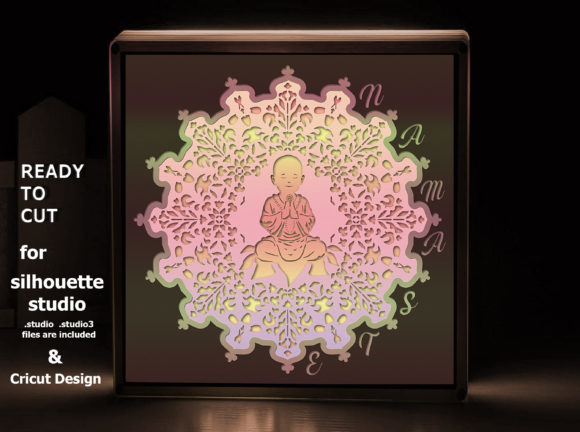
A shadow box is a type of picture frame that displays layered cutouts to form a 3D visual effect when light shines through. These boxes are popular in home décor, gift making, and art displays because they add depth and dimension without requiring advanced skills. The Little Buddha Shadow Box Template takes this idea further by providing a ready-to-use multilayer design featuring a serene Baby Buddha image surrounded by mandala elements.
Why Choose This Template?
This template is designed specifically for use with modern cutting tools such as Cricut and Silhouette machines, laser cutters, and CNC routers. It includes four distinct layers plus a background layer, all formatted in high-quality vector files like SVG, DXF, DWG, CDR, EPS, AI, and PNG. Each file format ensures compatibility across different platforms and devices, making it versatile for a wide range of creators.
One of the standout features is its adaptability. The base size is 8.5×8.5 inches (or 22×22 cm), but the design can be easily resized to fit other dimensions like 5×5, 7×7, 8×8, or even larger squares. This flexibility makes it perfect for custom framing, wall art, or personalized gifts.
Key Benefits at a Glance
- Ready-to-Use Design: Saves time and effort compared to designing from scratch.
- High Compatibility: Works seamlessly with Cricut, Silhouette Cameo series, and laser-cutting machines.
- 4 Layers + Background: Adds dimension and visual interest to your final product.
- Digital Files Included: Instant download with multiple file formats ensures convenience and accessibility.
- No Adjustments Needed: Files are prepped for direct cutting, so you don’t have to spend time resizing or aligning manually.
Beginner-Friendly Use Cases
If you're new to paper cutting or laser engraving, the Little Buddha Shadow Box Template is an excellent starting point. Here’s how you can begin using it:
- Download the ZIP File: After purchase, you’ll receive a single folder containing all the necessary design files. Make sure you’re connected to a stable internet connection during the download process.
- Select Your Machine Format: Open the relevant file in your software — for example, .studio or .gsp files work best with Silhouette Studio, while SVGs are ideal for Cricut users.
- Resize as Desired: The design is scalable. You can adjust it to match your project needs, whether you want a small ornament or a large wall hanging.
- Cut and Assemble: Once you’ve cut the layers, arrange them carefully to build up the 3D effect. A tutorial is included in the download to guide you through each step.
- Frame or Display: Use the largest square as the base for your shadow box. Frame it behind glass or hang it directly on a wall for a minimalist look.
Realistic Examples of Use
Here are some practical ways people have used the Little Buddha Shadow Box Template in their creative endeavors:
- Home Décor: Hang the finished piece in a meditation room or yoga space for a calming visual.
- Gift Making: Customize the size and frame it in a small wooden box to give as a meaningful gift for birthdays or housewarmings.
- Wedding or Event Favors: Incorporate the design into personalized thank-you cards or table centerpieces for a unique cultural touch.
- Educational Tools: Teachers can use it in art classes to introduce students to layering and design principles.
- Business Branding: Entrepreneurs often integrate shadow box art into branded merchandise or office spaces to reflect mindfulness and creativity.
Technical Details and File Formats
The template comes in various file types, each serving a specific purpose depending on your machine and software. For instance, SVG is great for Cricut, while DXF and DWG are preferred for laser cutters and CNC routers. The AI and EPS files are useful for professional editing in Adobe Illustrator or similar programs.
Included in the download are also specialized files for Silhouette Studio (.studio, .studio3, .gsp) in a separate folder named SilhouetteStudio.zip. These ensure smooth operation for users with Cameo, Cameo2, Cameo3, or Cameo4 machines. All layers are provided in individual files, which simplifies the customization process and helps avoid alignment issues.
Important Things to Consider Before Using the Template
Before diving into your project, here are a few things to keep in mind:
- Machine Compatibility: Double-check that your cutting machine supports the file formats included. Most modern Cricut and Silhouette models do, but older versions may require adjustments.
- Material Choice: While the template works with many materials, thin cardstock, vellum, or acrylic sheets yield the best results for layered shadow boxes.
- Lighting Matters: The 3D effect becomes more visible under proper lighting. Consider placing your shadow box near a window or adding a small LED light source for enhanced visibility.
- Storage and Delivery: Remember, this is a digital product only, so no physical items will be shipped. You’ll need a valid email and access to cloud storage if you plan to store the ZIP folder online.
How to Maximize the Value of Your Template
To get the most out of your Little Buddha Shadow Box Template, consider experimenting with colors and materials. You could print each layer on different colored papers or try translucent options to let the shadows blend beautifully. For a more luxurious finish, try using metallic or patterned cardstocks.
Additionally, think about how you might incorporate this design into a broader collection. Many crafters pair it with other spiritual or nature-themed templates to create cohesive wall art or decorative panels. If you're into selling handmade goods, this design can become a signature item in your inventory due to its universal appeal and thoughtful structure.
Pro Tips for Advanced Users
If you're familiar with design software, take advantage of the AI and EPS files to tweak the details. Add personal touches like names, dates, or symbols to make the design more bespoke. Also, the layered format is excellent for practicing precision cutting and assembly techniques. Try adjusting the spacing between layers to see how it affects the shadow patterns — subtle changes can dramatically alter the final aesthetic.
Who Can Benefit from This Template?
The Little Buddha Shadow Box Template is suitable for a broad audience. Educators can use it in classroom activities, hobbyists can enjoy weekend crafts, and professionals can apply it in branding or product packaging. Its spiritual theme and elegant appearance also make it appealing for bloggers, marketers, and entrepreneurs looking to infuse their content or products with a sense of peace and mindfulness.
Freelancers working with clients interested in wellness themes or cultural motifs will find this template particularly valuable. Small business owners might use it for retail signage or as part of a curated product line. Even casual users can benefit from its ease of use and instant gratification factor.
Final Thoughts
The Little Buddha Shadow Box Template is more than just a design — it's a gateway to creativity and craftsmanship. With its multilayer structure, compatibility with popular cutting machines, and potential for personalization, it stands out as a must-have for anyone interested in creating beautiful, meaningful art. Whether you're looking to decorate your home, express yourself artistically, or expand your product offerings, this template provides a solid foundation to start from.
So, if you're eager to bring a touch of serenity and sophistication into your next project, the Little Buddha Shadow Box Template is the perfect choice. Download it today and unlock a world of artistic possibilities!